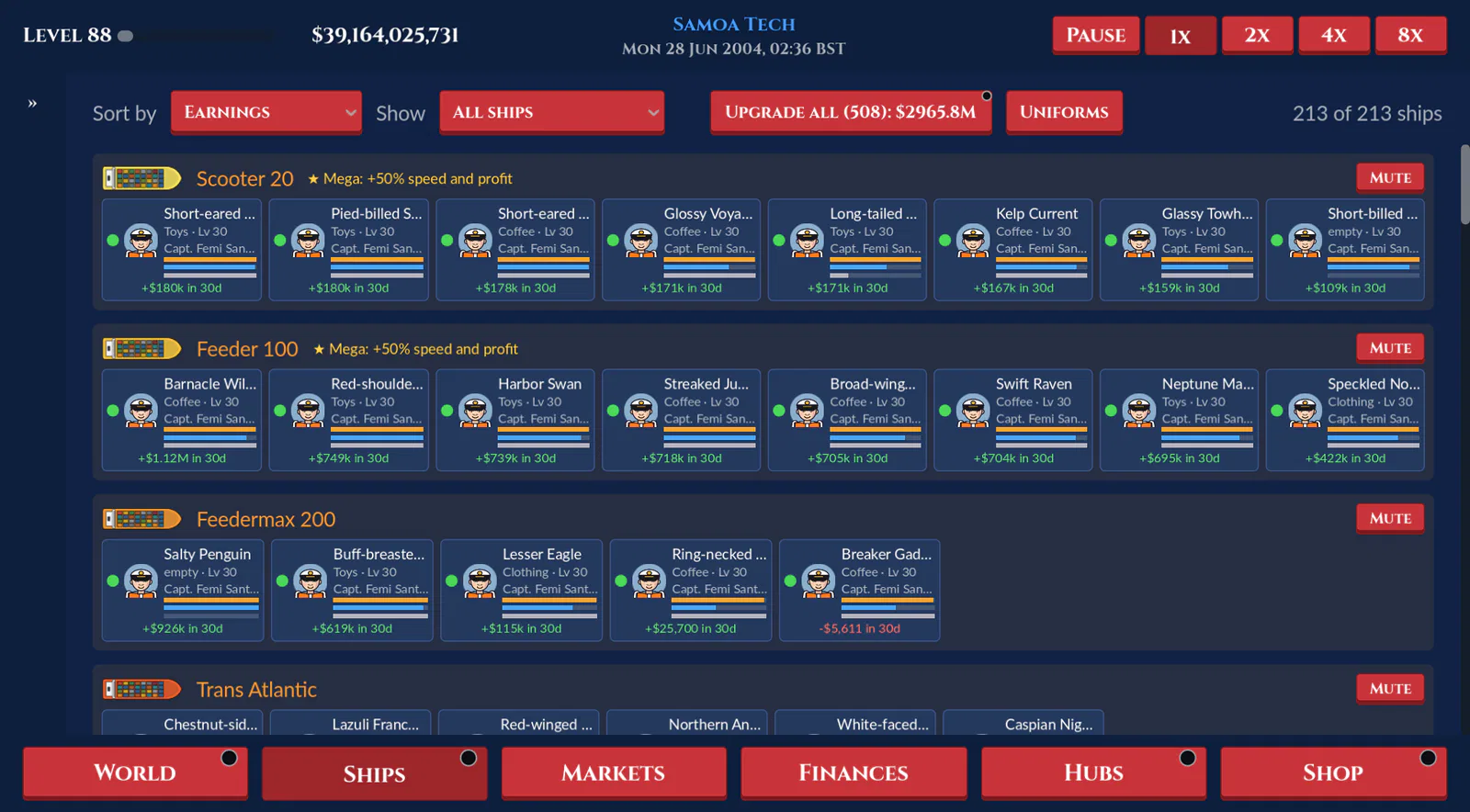
Scrolling list grouped by model (in shop order), each group on a faint tint of its ship line's color (the same colors as the Prices menu and Finances) under a picture of the model (bow to the right) and its name in that color, 8 compact tiles wide, one tile per owned ship. Groups with no ships (or none matching the filter) are hidden.
Each tile has its captain's face (a small round picture) beside three lines: the ship name (cut short with "..." if it doesn't fit), then its cargo and level in smaller text ("Coffee · Lv 7", in green with "+2" while it has upgrade points to spend; recovery boats say "Recovery"). A ship that needs the player for anything but upgrade points says why instead, in red ("Held in port", "Paused", "No route", "Lost at sea", "Waiting for toll money"). Then "Capt. " and its captain's name. Hovering a tile shows the full name and its status line (e.g. "Docked at Korsakov — not enough fuel for Hong Kong; turn on refuel").
Each tile shows the ship name, a status dot, and thin maintenance / fuel / cargo bars. Green = running (has route, not paused, not held); amber = waiting in port for money for a full load; red = docked (paused at a port, no route, or held in port).
Clicking a tile opens the ship popup.
Sort (within each model, left to right) by earnings, name, status (lost, then at risk, then held, then stopped, then running) or profit all time; show all ships, running, stopped, lost, or recovery boats. A count shows how many are shown. Tiles re-sort when the fleet or the sort changes, not live.
An "Upgrade all (N): $X" button (N unspent points, $X what they'd all cost) buys the fleet's upgrades cheapest first, as far as the money goes without dipping into the bank reserve. Each ship's points go round-robin to its lowest skill path, ties in the order speed, efficiency, durability (so speed 1, efficiency 1, durability 1, speed 2,... up to all 30), which is also its cheapest. Red dot while at least the cheapest is affordable; greyed out (tooltip: the cheapest's price) when there's nothing to buy or it can't be afforded. Each model's header also has its own "Upgrade N: $X" button, left of its Mute, for just that model's ships (hidden while they have none to spend; greyed while the cheapest would dip into the bank reserve).
Mega upgrade: once the company owns all 8 of a model and every one is at level 30, a "Mega upgrade: $1,000,000" button appears to the right of the model's name (red dot when affordable; greyed, with the reason, when not). It costs 80x the model's price and can be bought once per model. Every ship of that model, including later ones, then gets +50% top speed and +50% profit on each profitable trade (on top of other bonuses); recovery boats get +50% top speed and burn 50% less fuel instead (Buffalo $100,000,000, Mammoth $800,000,000). The name then shows a gold "★ Mega: +50% speed and profit" (or "+50% speed, -50% fuel") badge, and the activity log announces it. Mega upgrades are a line in the Finances totals and are saved.
 Maritime Empire